This site wears my desktop theme
My whole desktop reads its colours from one file. Switching scheme is one command, and everything on screen follows. The only thing that never followed was this site.
Now it does. In dark mode, the colours on this page are the ones my desktop had the last time the site checked. Light mode is the same scheme with its lightness flipped. The scheme’s name is in the footer.
What the theme covers
One scheme sets all of these at once:
- Terminal: background, text and the sixteen palette colours.
- Editor: the Neovim colorscheme, plus the statusline, highlights and rendered Markdown.
- Status bar: the bar across the top of the screen and its widgets.
- Wallpaper: each scheme names the wallpaper that goes with it.
And now a fifth: this site.
One palette, many readers
Each scheme is a small file of named colours, and a symlink marks which one is active. On top of the numbered slots sit four roles: text, muted text, selection and accent. A surface asks for the role it needs, so body text never ends up sharing a slot with something blue.
How the site finds out
The site is static, so there is no server to ask what my theme is. My machine knows, though, and my machine already pushes this repo on a timer.
Once a week, a short script loads the palette and takes five colours from it:
| The site needs | Taken from the scheme |
|---|---|
| Background | the background colour |
| Tile surface | the code block colour |
| Borders | the selection role |
| Text | the text role |
| Accent | the accent role |
It checks that each one is a real hex colour, then writes them into a small CSS file. That file is committed and pushed like any other change.
:root {
  --scheme-bg: #0e0f17;
  --scheme-surface: #181921;
  --scheme-line: #2a2c3d;
  --scheme-text: #cebead;
  --scheme-accent: #e6d0ba;
}

html[data-theme="dark"] {
  --bg: var(--scheme-bg);
  --surface: var(--scheme-surface);
  --line: var(--scheme-line);
  --text: var(--scheme-text);
  --ink: var(--scheme-accent);
  --ink-text: var(--scheme-bg);
}
Only the five hex values at the top change from one scheme to the next. Everything below them is fixed.
The repo does not hold my schemes, only the current one.
The stylesheet never names a colour either: it says background: var(--bg) and leaves the rest to this file.
So replacing five values recolours the whole site, with the accent becoming the primary button and the logo mark.
Light mode from a dark scheme
Every scheme I use is dark, so there is no light palette to copy. Light mode is derived instead: each colour keeps its hue and gets a new lightness.
html[data-theme="light"] {
  --bg: oklch(from var(--scheme-text) 0.975 0.012 h);
  --text: oklch(from var(--scheme-text) 0.26 0.03 h);
  --ink: oklch(from var(--scheme-accent) 0.4 0.08 h);
}
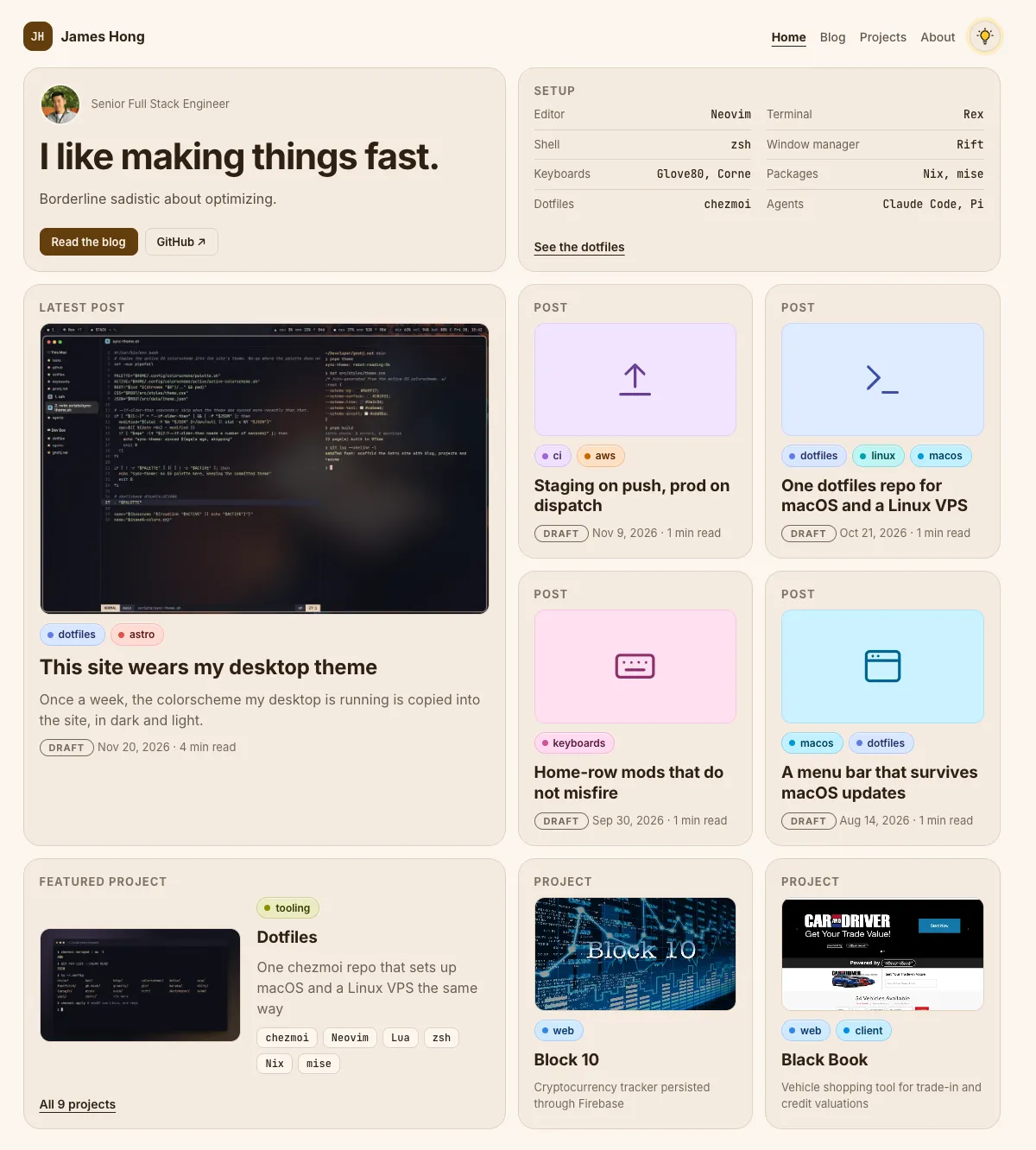
The page background is the scheme’s text colour made almost white, and the text is that same colour made almost black. The scheme’s own background is too close to black to have a dependable hue, so it is not used here. A cool scheme gives a cool paper tone and a warm one gives a warm tone, without my choosing either.
What it looked like when I wrote this
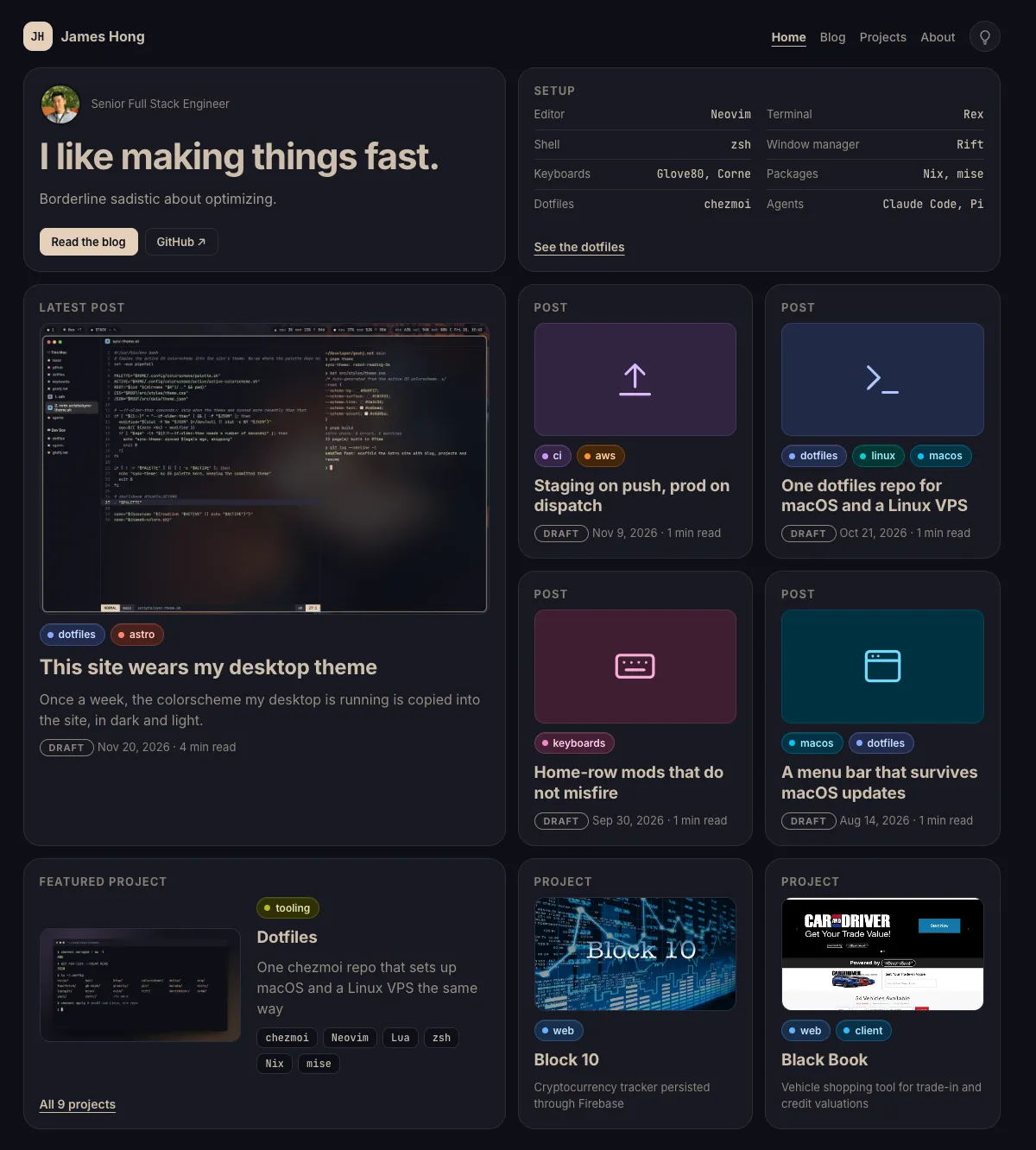
The theme might have changed by the time you read this, so here is the site on the day of this post.
The scheme was robot-reading-5k, the same one in the desktop image at the top, and the values in the code above are its colours.
And the same scheme in light mode, where the warm text colour becomes the paper tone:
Why only once a week
I switch schemes often, sometimes several times in an afternoon. If the site followed every switch, each one would be a commit and a deploy. So it checks once a week and takes whichever scheme is active at that moment. The site can trail my desktop by up to seven days, and that is on purpose.
It still builds anywhere
The theme ends up as two small files committed to the repo. On a machine without my palette, such as a CI runner, the script does nothing and the build uses the last committed theme.