Staging on push, prod on dispatch
This is the deploy pipeline I reach for on a static site. It has three triggers and one rule: a commit is built once, and every environment gets those same files.
The three triggers
| Trigger | What runs | Where it lands |
|---|---|---|
| A pull request | Build, then deploy a preview | A URL unique to that PR |
| A merge to main | Build, store the build, deploy it | Staging |
| A manual run, by SHA | Copy a stored build | Production, after approval |
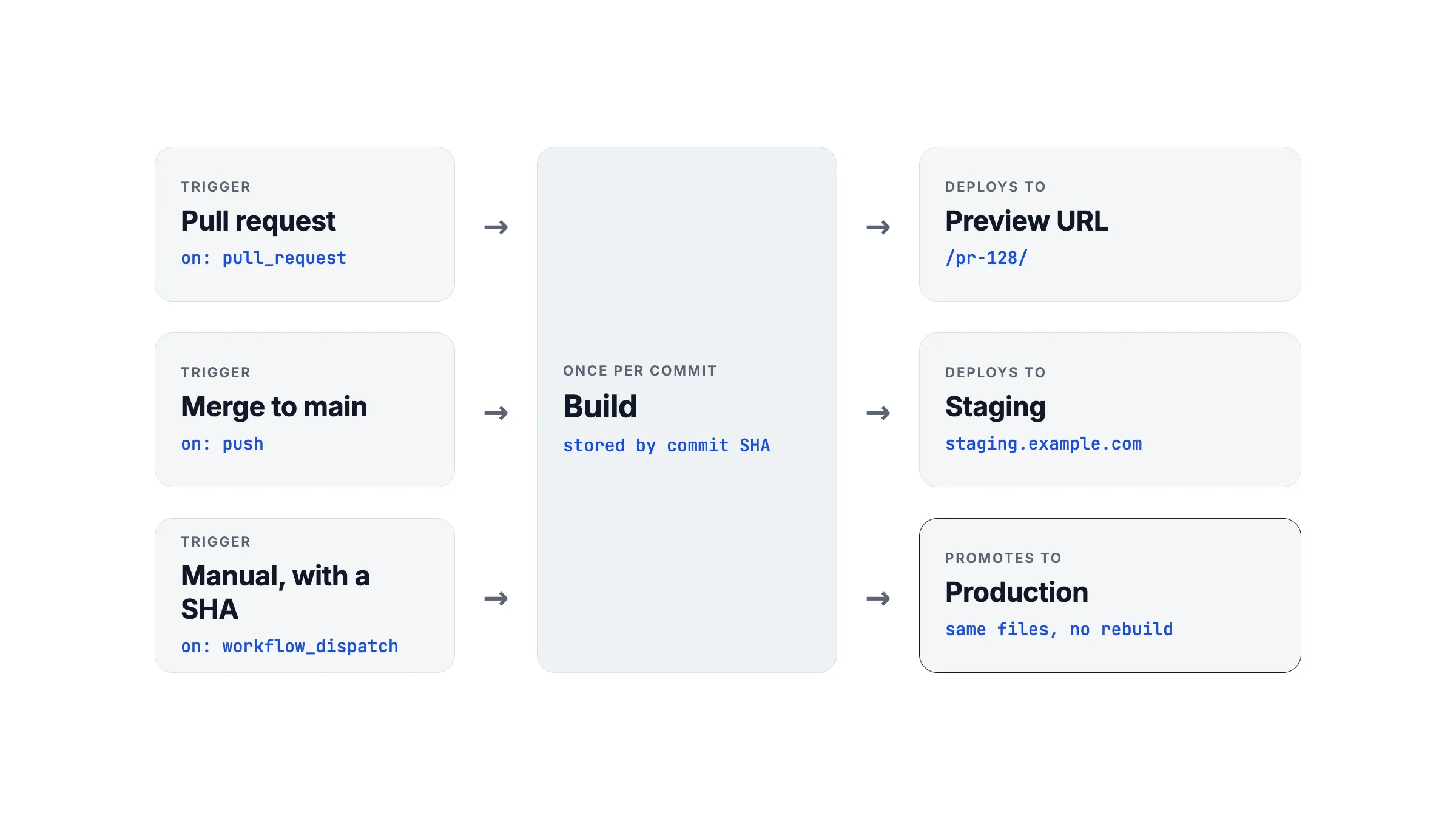
Nothing reaches production because of a push. Someone has to ask for it, and name the commit.
Build once
The build is the expensive, variable step. A dependency can publish a new patch release between two runs, and the same commit then produces different files.
So the build runs once per commit, and the output is stored under that commit’s SHA.
- run: pnpm install --frozen-lockfile
- run: pnpm build
- run: aws s3 sync dist "s3://my-builds/${{ github.sha }}" --delete
Every later step copies from that folder. None of them runs the build again.
Previews per pull request
Each pull request deploys to its own path and posts the link back as a comment.
on:
  pull_request:
    types: [opened, synchronize, reopened, closed]

jobs:
  preview:
    if: github.event.action != 'closed'
    runs-on: ubuntu-latest
    steps:
      - uses: actions/checkout@v4
      - run: pnpm install --frozen-lockfile && pnpm build
      - run: aws s3 sync dist "s3://my-staging/pr-${{ github.event.number }}" --delete
A second job runs when the pull request closes and deletes that path. Without the cleanup, the bucket fills up with previews nobody will open again.
A review is easier when the reviewer can click a link than when they have to check out a branch.
Staging on merge
A merge to main builds, stores the build, and deploys it to staging. Staging is where I look at the change with production data and a production URL shape.
One setting matters here:
concurrency:
  group: staging
  cancel-in-progress: true
Two merges close together would otherwise race, and the older one could finish last. Cancelling the run in progress means staging always ends on the newest commit.
Promoting to production
Production is a manual workflow that takes a commit SHA.
on:
  workflow_dispatch:
    inputs:
      sha:
        description: Commit already deployed to staging
        required: true

jobs:
  promote:
    environment: production
    runs-on: ubuntu-latest
    steps:
      - run: aws s3 sync "s3://my-builds/${{ inputs.sha }}" s3://my-production --delete
      - run: aws cloudfront create-invalidation --distribution-id "$DISTRIBUTION" --paths "/*"
The environment: production line is what adds the approval.
GitHub pauses the job until a named reviewer accepts it, so a mistyped SHA has one more stop before it is live.
Why promote instead of rebuild
Rebuilding for production means the files that go live have never been looked at. They are probably the same as staging. Promoting removes the word probably.
It is also faster. Copying a folder takes seconds, where a build has to install dependencies first.
Rolling back
Because every build is kept by SHA, a rollback is the same workflow run with an older commit. There is no revert commit to write and no build to wait for while the site is broken.
I keep stored builds for a few weeks and expire the rest with a lifecycle rule.
Credentials
No access keys are stored in the repository. The workflow asks AWS for short-lived credentials through OpenID Connect, and the role it assumes can only touch these buckets.
permissions:
  id-token: write
  contents: read

steps:
  - uses: aws-actions/configure-aws-credentials@v4
    with:
      role-to-assume: ${{ vars.DEPLOY_ROLE_ARN }}
      aws-region: us-east-1
What it costs
This is more than a personal site needs on day one. It adds a second bucket, a preview cleanup job and an approval step.
This site started with less: one command on my laptop that builds, syncs and invalidates. The pipeline above is where it is heading, and the deploy script was written so that CI can run the same steps.